
A guest sees a room price, picks dates and opens checkout. If an unavoidable charge appears only after that decision, the guest has been comparing a different amount from the one the hotel expects to collect. Hotel booking engine software should be tested against the real guest journey, including mobile layouts, rate rules, optional fees and the deposit sent to the payment provider. A handful of priced test stays can reveal a disconnect between the marketing page, the engine and the folio. Build those cases before making a fee change or picking a new vendor.
Identify the prices that have to agree
The FTC's guidance on the Rule on Unfair or Deceptive Fees describes disclosure obligations for covered short-term lodging. It explains that covered businesses generally must include mandatory fees in the displayed total price and display that total more prominently than other pricing information. It also addresses excluded government charges, optional items and the final payment amount before payment. Check the rule’s application, the exact requirements and other relevant law with the responsible adviser. Use the pricing method in the test that a guest can actually choose.
Build a list of fee names, codes, ownership and basis. Record which are assessed per room, night, person or stay. Identify how the system handles a fee that starts after a specific date and whether the date is when a reservation is made or when the guest stays. Document which items are optional in the actual workflow. A charge that guests cannot reasonably avoid, or an item inserted by default, may be treated differently from a selection made freely. Confirm the classification before changing what the hotel displays. Then use the same guest-facing description in each affected system.
Test a complete price with real arithmetic
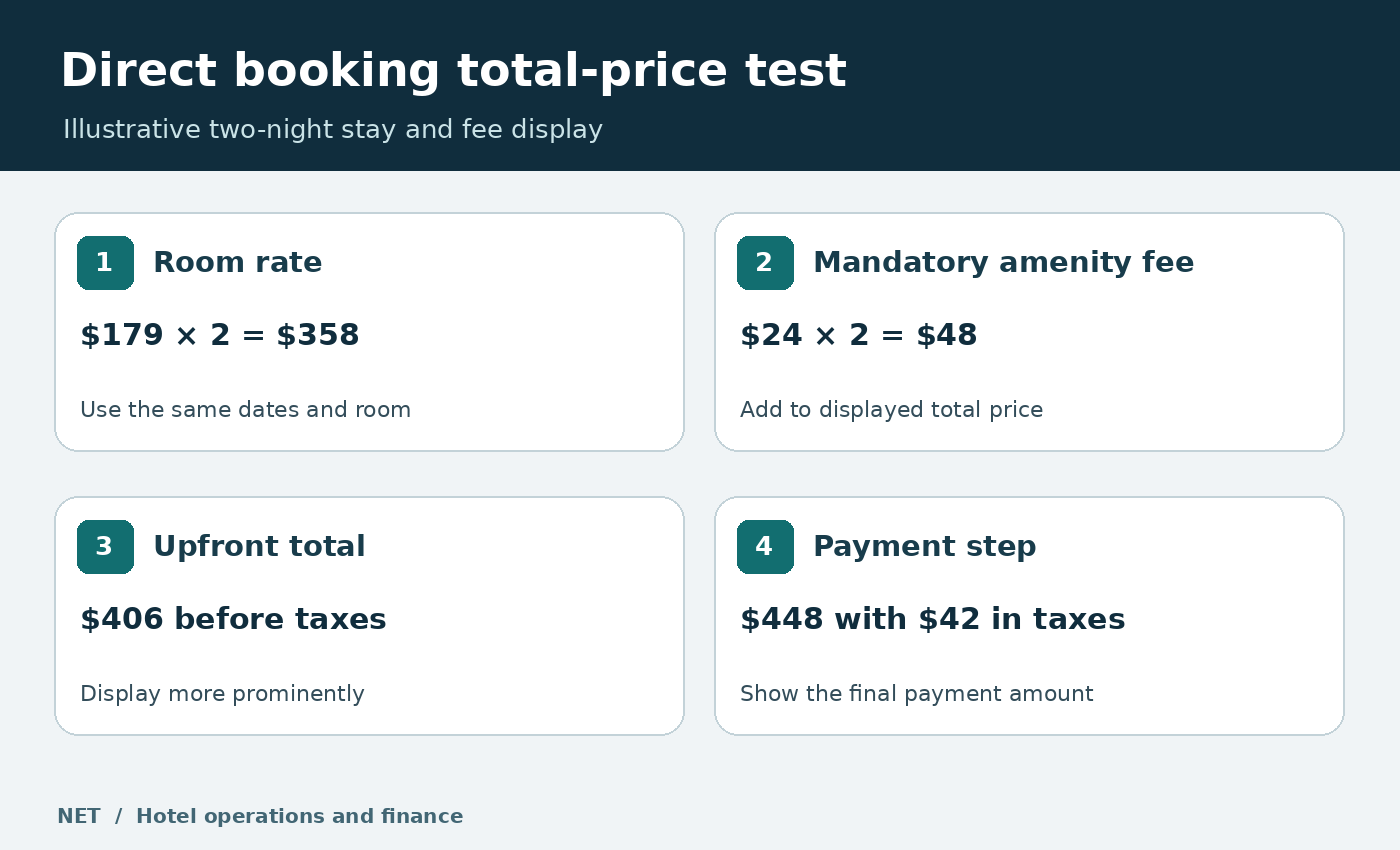
Assume a two-night stay at $179 per night and a mandatory amenity fee of $24 each night. Room rates total $358 and the mandatory fee adds $48. The illustrative upfront total is $406 before eligible taxes. If applicable government taxes in the scenario are $42, the final amount payable is $448 before any voluntary add-on. Prepare the expected amounts before testing. Check the initial display, rooms list, package or rate detail, checkout, guest confirmation and the PMS record using the same dates, occupancy and rate plan. Make sure an earlier screen did not quote a different hotel, date pair or currency.
If the hotel offers optional parking at $16 per night, selecting it for both nights adds $32 before any applicable taxes on the selection. Check that it can be declined, the selection state survives only as expected, and the total recalculates correctly. If payment is due partly now and partly at the property, distinguish those amounts from the total stay price. Check what happens for late arrival, cancellation and changes to dates. Some fees are affected by a new number of nights while others are tied to the booking itself. The program should show whether a guest is reviewing a new price before confirming the change.
Follow pricing through mobile, widgets and landing pages
Record which site pages, search results, campaign landing pages or package details show price before the hotel booking engine loads. Check the direct widget if it opens a third-party checkout page. Test when the guest selects a date from a room page versus entering through a campaign with dates prefilled. If the hotel changes responsive layouts by screen size, verify which amounts are visible, prominent and nearby on a narrow phone. Check whether a call-to-action overlays the displayed price or the final confirmation. Keep screenshots of test records without guest information in the acceptance file.
Try two adults versus one guest, one versus two nights, different arrival days, a special rate and a rate that changes by date. For a booking crossing a pricing change, calculate the expected rates for each date and verify the logic. Add and remove an optional extra, go back one page and check that the system does not silently restore the selection. Open a second test for another room before reusing the first guest basket. Check that each price reflects the room it represents. Flag exceptions where the guest would see a price other than the amount staff expects to charge.
Compare the hotel folio with receipts and merchant settlement
A test with $448 payable and $224 due at booking should identify the amount paid, the balance and the due dates under the relevant terms. Use an approved vendor test environment to verify the amount sent to the processor and show the resulting notification on the PMS record. Test a decline, an attempted retry and a confirmed booking. The vendor should demonstrate what happens when a payment is accepted but a confirmation is delayed, including how staff can determine whether a second booking would create a duplicate. Keep approved processor references, not sensitive card data, in the test material.
When a booking is changed, compare the amount, taxes, fees, refunds and payment schedule with the relevant rule. If parking is dropped after a guest made a deposit and receives a credit, confirm how the amounts appear in confirmation and accounting. Check the merchant and operating business dates as well. A processor’s settlement may occur on a different day without any discrepancy in the payable charge. Record what should happen for the original transaction, the adjustment and the accounting record. Establish who can approve a refund and how staff should check that it reached the correct transaction.
Test a new package before it reaches a live campaign
Create one package with a required included service and one with a truly optional add-on. Verify what the price represents at each stage and whether descriptions clearly match the booking. If the hotel advertises a discount or compares against an earlier rate, document the basis and submit the claim to the property’s designated reviewer. Examine the relationship between hotel and third-party feeds where relevant. A change made in one rate feed may not be reflected in the property’s listing immediately. Record which update is responsible for each price and how to identify delays.
For a property-wide fee change, specify the responsible website editor, pricing owner, engine provider, front desk supervisor and payment team. Confirm the new effective date, treatment of older reservations and permitted exceptions. Ask the provider to show how the price rule can be verified before consumers see it. Once released, run a small set of approved smoke tests on dates that were priced before and after the change. Record which surfaces still require an update. Pause ads or other distribution paths that depend on incorrect totals according to the property’s normal process.
Evaluate a pricing error from the guest’s point of view
Give a staff member both the actual test display and the expected price with realistic data. Suppose a property shows $179 per night on a room page, sends the guest to a widget showing $203 per night after the mandatory fee and provides $448 at checkout including the $42 taxes for two nights. The team needs to ask whether the first display meets the applicable rules and compare the same room and conditions across screens. Seeing the correct figure at checkout does not answer whether earlier disclosures were sufficient. Have someone review the size and placement of displayed figures as well as the calculation.
Add a reconciliation path if the vendor fixes only one screen. Test a marketing link, widget and direct engine entry again for each affected rate. Verify amounts for phone and larger-window layouts. Then see whether the new settings change a prior booking when viewed by staff. Preserve the relevant policy version and expected result. If a guest contacts the desk over an amount that differs from what it saw, the hotel should be able to identify the exact screen and rate without exposing guest details to staff who do not need them.
Turn the examples into vendor acceptance criteria
Require the provider to explain which system provides the authoritative price, fees and taxes. Ask for a sample record of what goes to the processor and PMS and see whether staff can check it without vendor assistance. Confirm who can adjust a configuration, how changes are logged, and whether a staged review is possible. Simulate missing data in the approved environment and test how the guest and front desk are informed. A provider’s promise that the engine supports a total-price rule is easier to verify when the property can reproduce an actual quote and booking receipt.
Prepare cases for two date changes and a refund
Suppose a guest shortens the two-night booking to one night without changing room type. Before taxes, the room and mandatory fee in the original example recalculate to $203. If the property has already taken a $224 deposit, the remaining balance depends on the revised tax and applicable terms. Check whether the guest sees the revised total and deposit already paid before confirming. Verify any refund on the original processor transaction. Do not assume that a one-night amount is exactly half the original final balance, particularly where taxes or fees are assessed differently across dates.
A second test can extend the stay into a higher-priced weekend. Keep the two consecutive nightly rates and their mandatory amounts visible to finance, and check that the displayed total aggregates the right dates. Compare selected optional extras after the change. A parking selection should apply only to the dates supported by the property’s actual configuration. Use a controlled test profile and verify the relevant acceptance record without gathering excessive information. Ask the receptionist how it would explain any rate or fee change to a caller with the confirmation in hand.
If a guest requests a cancellation through a hotel agent rather than online, record the source of the policy displayed and the appropriate handling of the amount due or refund. Check who can authorize a change for a stay crossing a fee update. The property should have one place to record a controlled exception and reconcile it with the confirmation. If the vendor cannot reproduce an accepted price on older bookings, document that gap and decide how to retain the relevant booking records securely.
During final prelaunch review, ask someone who did not build the test to reproduce one of the price schedules. Give them the stay dates, rate and chosen extras. A repeatable calculation catches problems hidden in a reassuring screen or a demonstration account.
Use the hotel booking engine comparison for the wider vendor evaluation, hotel payment processing guide for settlement and authorizations, and hotel property management software guide to trace the folio. The hotel should be able to quote the same stay across screens, explain any legitimate difference, and prove the amount its payment system actually receives.